A lot of people want to build a YouTube channel but never start because they do not want to be on camera. Maybe you are uncomfortable with how you look on screen, maybe you value your privacy, or maybe you just do not want your face attached permanently to something on the internet. Whatever the reason, I want to tell you something clearly: you do not need to show your face to build a successful YouTube channel.
Some of the most-watched channels on YouTube have never revealed who is behind them. Finance channels, documentary channels, history channels, tech review channels, motivational channels — creators in these niches regularly hit millions of subscribers without anyone ever knowing what they look like. The audience does not care about your face. They care about the value you give them.
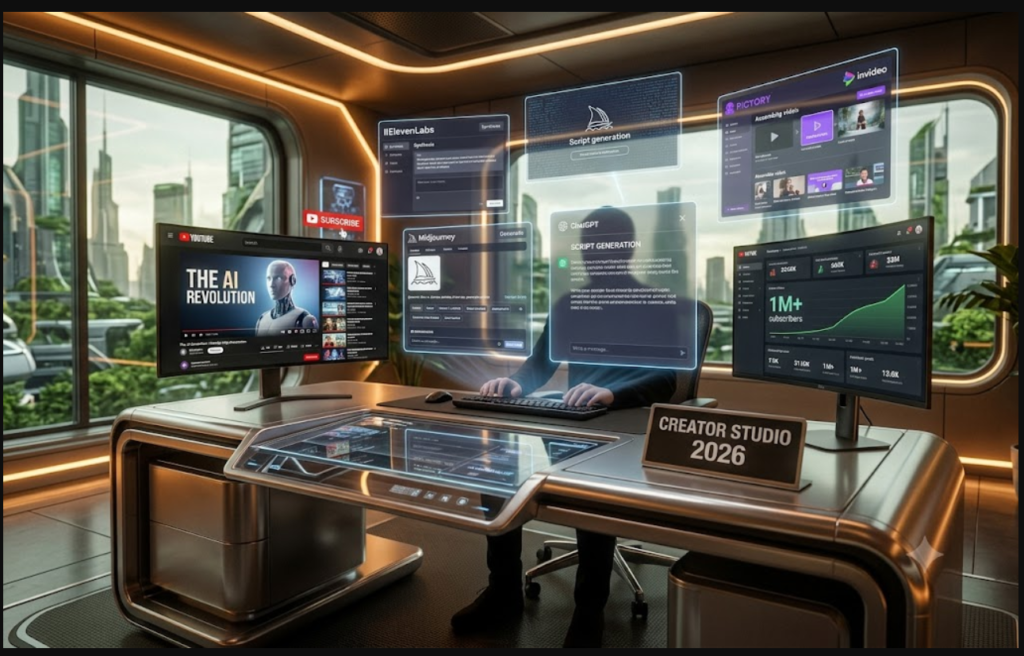
What has changed recently is that AI tools have made faceless channels dramatically easier to start and run. Things that used to require hiring voiceover artists, video production companies, and graphic designers can now be done solo with affordable tools. In this guide, I will walk you through the entire process — from picking your niche to publishing your first video.
Why Faceless Channels Work So Well
The instinct most people have is that viewers want to connect with a person, and therefore showing your face is essential. That instinct is partially right — viewers do want to connect. But connection comes from voice, personality, storytelling, and perspective, not from seeing someone’s face.
Think about the last time you listened to a podcast. You probably feel a genuine connection to the host even though you likely cannot picture their face. Faceless YouTube channels work on the same principle. Your narration style, your choice of topics, your sense of humour or your depth of knowledge — these are what build an audience. The face is optional.
The categories where faceless channels perform best tend to be ones where the content itself is more interesting than the person presenting it. Documentary-style content, explainer videos, fact-based content, ambient and relaxation content, educational tutorials, and news-style commentary all work extremely well without a face. And if you are already running a blog about AI tools for creators, you are sitting on a niche that is both in demand and perfectly suited to this format.
Step 1: Choose Your Niche Carefully
The niche you choose determines almost everything about how sustainable your channel will be. For a faceless channel specifically, you want a niche where content does not go stale quickly, where there is consistent search demand, and where you can produce content without needing personal charisma to hold viewer attention.
Given that you run a blog about AI tools for YouTube creators, the obvious move is to build a faceless channel in the same space. The AI tools niche is growing rapidly, people are searching for tutorials and reviews constantly, and the content format — screen recordings, demonstrations, narrated explainers — is naturally suited to faceless production.
Topics that would perform well for a channel in this space include AI tool tutorials and reviews, comparisons between tools, weekly AI news roundups, beginner guides to using AI for specific tasks, and case studies showing how creators have used AI tools to grow their channels. You already have most of this content in blog form — turning it into videos is a logical extension rather than starting from scratch.
Step 2: Write Your Scripts with ChatGPT
Because no face is carrying the viewer’s attention, your script needs to do more work. The writing has to be engaging enough on its own that people keep watching. This is actually where AI helps most.
The key difference in scripting for a faceless channel versus a talking-head channel is narration style. You are not a person speaking to the camera — you are a narrator taking the viewer on a journey through information. The tone should feel more like a documentary and less like a vlog.
Use this prompt to get strong first drafts from ChatGPT:
“Write a YouTube script for a faceless narration-style channel about [TOPIC]. The video should run approximately 8 to 10 minutes at a natural reading pace. Write in a narrative, engaging style — like a knowledgeable guide leading the viewer through new territory, not someone talking to a camera. Open with a hook in the first 30 seconds that makes the viewer curious about what comes next. Use short paragraphs, natural pauses, and clear transitions between sections. Vary the sentence length to maintain rhythm. End with a clear takeaway and a soft call to action. Avoid starting sentences with ‘I’ and avoid phrases that only make sense when there is a person on screen.”
That last instruction matters. Phrases like “as you can see” or “I am sitting here today to tell you” are jarring in a faceless video. The prompt reminds the AI to write copy that works without a presenter.
For a 10-minute video, aim for roughly 1,300 to 1,500 words. After the AI produces the draft, go through it and add specific examples, current data, and any personal insight that makes the content more useful than what someone could find in five minutes of Googling.
Step 3: Generate Your Voiceover with ElevenLabs
Your voice is the personality of your faceless channel. The good news is that your voice does not have to be your actual voice.
ElevenLabs is the best AI voiceover tool available right now by a significant margin. The voices it produces are natural enough that most viewers cannot tell they are AI-generated — which matters more than it might seem. Robotic-sounding narration is one of the fastest ways to lose a viewer regardless of how good your content is.
Here is how to use it:
Go to ElevenLabs and browse the voice library. Listen to several options and find one that matches the tone you want for your channel — some voices feel more authoritative, others more conversational, some more warm and approachable. Once you have your voice, paste your script into the text editor, adjust the pace if needed, preview it, and download the MP3.
One thing worth investing time in early: voice consistency. Pick one voice and stick with it across your entire channel. Viewers build familiarity with your voice the same way they build familiarity with a face — changing it disrupts that connection.
If you want to explore alternatives, Murf AI is strong for professional and corporate tones, and Play.ht handles multilingual content well if you ever want to expand into other language markets.
ElevenLabs has a free plan with limited monthly characters. For regular posting you will likely need a paid plan, which starts at around $5 to $11 per month depending on usage.
Step 4: Create Your Video with Pictory or InVideo AI
Now you need visuals to accompany your narration. This is where the choice of tool depends on how much control you want versus how much time you want to spend.
Pictory AI — The Fastest Route from Script to Video
Pictory takes your script, matches stock video clips to each section of the narration automatically, and lets you add your voiceover in one click. For a creator who wants to go from script to finished video as quickly as possible, Pictory is the most efficient option available.
The stock footage library is large and generally good quality. The auto-captioning is accurate. The interface is simple enough that you can produce a complete video in under two hours once you have your script and voiceover ready.
It is not the tool for highly creative or visually distinctive content — the footage it selects can feel generic if you do not curate it carefully. But for informational content, tutorials, and news-style videos, it gets the job done quickly.
Plans start at around $19 per month.
InVideo AI — More Control, More Flexibility
InVideo gives you more creative direction over each scene while still handling much of the production automatically. You can guide the AI with scene-by-scene instructions and the tool gives you more options for customising transitions, text overlays, and music.
If you want your channel to have a more distinctive visual style than most faceless channels, InVideo is worth the additional time investment. There is a free plan available, though it adds a watermark to exports — the paid plans start at $20 per month and remove this.
Step 5: Design Thumbnails with Canva AI
Faceless channels cannot use a person’s face on thumbnails the way many personality-driven channels do. This is actually fine — some of the most effective thumbnail styles for faceless channels do not use faces at all.
Text-forward thumbnails work especially well. A bold statement, a number, or a question set against a striking background often outperforms a face-based thumbnail in informational niches because the text communicates the value proposition immediately.
Use Canva AI to build a thumbnail template for your channel with consistent colours and fonts. Once the template exists, creating a new thumbnail for each video takes about fifteen minutes. Consistency across thumbnails makes your channel look more established than it is and helps returning viewers recognise your content in their recommended feed.
For AI-generated background images, Adobe Firefly or Midjourney can produce dramatic visuals that make text-forward thumbnails much more eye-catching than a plain colour background.
Step 6: Optimise Every Video for SEO
For faceless channels, SEO is even more critical than for personality-driven channels. You do not have a recognisable face that people search for by name. Your growth depends on the algorithm finding your content and matching it to people who are searching for what you cover.
Before every video, use VidIQ to find a specific keyword with real search volume and manageable competition. Write your title to include that keyword naturally. Use ChatGPT to write a 250-word description with the keyword in the first sentence. Add relevant tags using TubeBuddy’s suggestions.
Consistency here matters as much as quality. Every video should be fully optimised before it publishes — not as an afterthought.
Step 7: Post Consistently and Give It Time
The hardest part of building a faceless YouTube channel is not the technical production. It is posting consistently during the months when almost nobody is watching.
Most faceless channels follow a predictable growth pattern. The first two months are nearly invisible — low views, minimal subscriber growth, and no external validation that the effort is worth continuing. This is the period when most people quit, and it is exactly the period you need to push through.
From month three or four, if you have been consistent, the algorithm starts to understand your niche and your content begins appearing in suggestions alongside other videos in your space. A video occasionally picks up unexpected traction. Subscribers start growing more steadily.
By month six to nine, if you are posting three to five times per week and optimising your SEO, most channels in the AI tools niche have enough momentum that growth starts to feel self-sustaining.
The creators who make it to that point almost always cite the same thing: they treated the channel like a job during the early months even though it did not feel like one yet.
What a Faceless AI Tools Channel Can Realistically Earn
Income for this type of channel comes from several directions simultaneously, which is what makes it genuinely attractive as a business model.
YouTube’s AdSense programme activates once you hit 1,000 subscribers and 4,000 watch hours. In the AI and tech niche, CPM rates are among the highest on the platform — typically $8 to $20 per thousand views. At 100,000 monthly views, that is roughly ₹65,000 to ₹1,60,000 per month from ads alone.
Affiliate commissions on AI tools, which pay 20% to 50% recurring commissions on monthly subscriptions, can match or exceed ad revenue even at much smaller channel sizes. A channel with 5,000 subscribers in this niche can earn meaningful affiliate income because the audience is specifically interested in AI tools and is therefore much more likely to convert.
Sponsorships from AI and SaaS companies come earlier than most creators expect in this niche. Companies in this space actively look for channels with engaged audiences, even relatively small ones, because the audience targeting is so precise.
Your First Month Action Plan
Week one: finalize your niche angle, set up accounts on ElevenLabs, Pictory, Canva, and VidIQ. Write and produce your first two videos.
Week two: publish your first video, start your second, and post your first YouTube Short repurposed from video one using Opus Clip.
Week three and four: get into a rhythm of producing two to three videos per week. Focus on consistency, not perfection.
The goal for month one is not views. It is establishing a workflow that you can sustain.
Final Thoughts
A faceless AI tools channel built on the back of an existing blog is one of the most practical content business models available right now. You already have the knowledge, you already have the content ideas, and you already have SEO skills from running the blog. The AI tools handle the production. Your job is the strategy, the quality control, and the consistency.
Start with one video. Get the workflow right. Then repeat.
For a full breakdown of the AI tools that can support every part of your YouTube and content creation workflow, check out our complete guide on the best AI tools for YouTube creators.
Ótimo artigo! O Van Gogh Free AI Video Generator em / tem sido útil em fluxos parecidos. Van Gogh Free AI Video Generator
Appreciate the depth in this piece. For quick AI video drafts, see Pixwit at /. Pixwit