Disclosure: This article contains affiliate links. If you purchase through one of these links, we may earn a commission at no extra cost to you. We only recommend tools we’ve personally researched and tested.
Quick answer: Databox is the best pick for boutique agencies wanting conversational AI analysis on a budget (free tier, or ~$47+/month). Whatagraph is the best choice when polished, client-ready report design matters most (~$229+/month). AgencyAnalytics is the best fit for SEO/PPC agencies needing fast, templated client reports (~$59-349/month).
If your marketing data lives across Google Analytics, Google Ads, Meta Ads, and half a dozen other platforms, building a client-ready or stakeholder-ready report manually every week is a time sink. AI-powered reporting tools now handle the data pulling, visualization, and — increasingly — the written analysis for you.
We compared three of the most established platforms — Databox, Whatagraph, and AgencyAnalytics — on features, AI capabilities, and pricing.
Quick Verdict
| Best For | Starting Price | |
|---|---|---|
| Databox | Boutique agencies wanting conversational AI analysis | Free tier / ~$47–200+/month |
| Whatagraph | Agencies where polished, client-ready report design matters | Free tier (5 credits) / ~$229+/month |
| AgencyAnalytics | SEO/PPC agencies needing fast, templated client reports | ~$59–349/month |
1. Databox
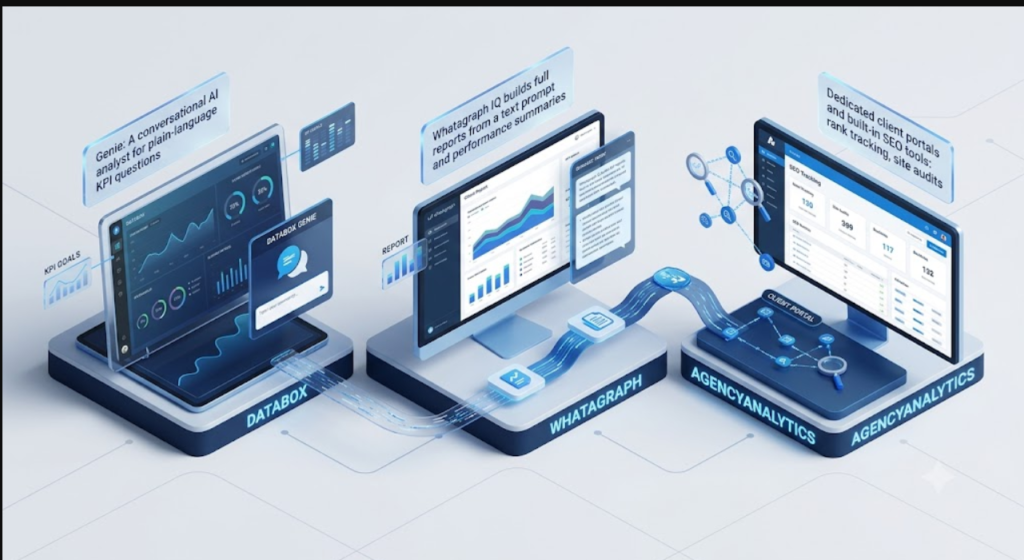
Databox has moved from a simple dashboard tool into something closer to a conversational data analyst. <cite index=”20-1″>Its headline feature, Genie, lets you ask a plain-language business question and get a clear answer with visual context, without needing to build a dashboard first or write any SQL</cite>.
Key Features
- <cite index=”20-1″>120+ native connectors, plus spreadsheet and database support for custom data sources</cite>
- Genie: a conversational AI analyst for plain-language KPI questions
- <cite index=”20-1″>MCP support, allowing you to connect Databox directly to Claude or ChatGPT to query your marketing data from within those assistants</cite>
- Goal tracking with visual progress indicators against targets you set
Pros
- <cite index=”26-1″>The free tier is genuinely generous, including three data source connections</cite>
- Strong for quick “are we on track?” checks against KPI goals
- Good mobile app for checking numbers on the go
Cons
- <cite index=”26-1″>AI features are locked behind the Growth plan and higher, and come with daily usage caps</cite>
- <cite index=”26-1″>Not built for complex, ad-hoc data exploration — it’s stronger at monitoring known metrics than open-ended analysis</cite>
- <cite index=”19-1″>Pricing is charged per data source connection, so costs can climb faster than expected as you scale</cite>
Pricing <cite index=”27-1″>Databox typically starts around $47/month and climbs into the $135–200+/month range</cite> depending on how many data sources and users you add, with a free tier available for very light use.
2. Whatagraph
Whatagraph has built its reputation on report aesthetics — and increasingly, on AI-assisted report generation. <cite index=”20-1″>Its IQ feature builds full reports from a text prompt, writes performance summaries directly inside reports, and can even apply client branding based on a screenshot</cite>.
Key Features
- <cite index=”20-1″>55+ native connectors with blended metrics across channels</cite>
- Whatagraph IQ: generates entire report structures and written summaries from natural-language prompts
- <cite index=”20-1″>MCP connectivity to link your governed data layer to Claude or ChatGPT</cite>
- Strong visual/design templates aimed at client-facing deliverables
Pros
- <cite index=”25-1″>Best-in-class report design among the platforms compared — reports look genuinely built for a client audience rather than templated</cite>
- AI-written performance summaries save real time on the “explaining the numbers” part of reporting
- Good fit for agencies where the polish of the deliverable directly affects client retention
Cons
- <cite index=”26-1″>Priced well above budget alternatives — its starting point puts it firmly in “established agency” territory, not solo-freelancer economics</cite>
- Overkill if you just need internal KPI tracking rather than client-facing reports
- Full value depends on actually using the design/branding features; if you just need raw dashboards, you’re paying for more than you need
Pricing <cite index=”24-1″>Whatagraph offers a free plan with 5 credits, with paid plans starting around $229/month</cite> and custom enterprise pricing above that.
3. AgencyAnalytics
AgencyAnalytics is built specifically around one workflow: agencies reporting to multiple clients. <cite index=”20-1″>It handles straightforward SEO-focused reporting particularly well, though agencies running complex cross-channel PPC and social campaigns at scale may hit its limits</cite>.
Key Features
- Built-in SEO tooling: rank tracking, site audits, and backlink monitoring included rather than requiring separate tools
- <cite index=”22-1″>Branded client login portals where each client views their own dashboards and reports without accessing your main agency account</cite>
- MCP support included on its Core plan for AI-assisted querying
- Per-client pricing structure, which scales predictably as you add accounts
Pros
- <cite index=”21-1″>Fast to set up for a small-to-mid PPC or SEO agency needing quick client reports with rank tracking built in</cite>
- Consolidates several tools (SEO auditing, rank tracking, reporting) into one subscription
- Well-executed client portal experience, which reduces client back-and-forth
Cons
- Less suited to agencies managing heavy cross-channel PPC and social alongside SEO
- <cite index=”19-1″>Charges per client, so costs scale directly with how many accounts you manage — worth modeling out before committing</cite>
- Report design is functional rather than the visual showpiece Whatagraph offers
Pricing <cite index=”19-1″>AgencyAnalytics runs from roughly $59 to $349 per month</cite> depending on the number of client accounts and features needed.
Side-by-Side Comparison
| Factor | Databox | Whatagraph | AgencyAnalytics |
|---|---|---|---|
| Best for | KPI monitoring + AI Q&A | Client-facing report design | Agency SEO/PPC reporting |
| AI capability | Genie conversational analyst | IQ report generation + summaries | MCP querying on Core plan+ |
| Connectors | 120+ | 55+ | Marketing/SEO-focused set |
| Client portals | Basic | Strong branding options | Purpose-built, well-reviewed |
| Starting price | ~$47/month | ~$229/month | ~$59/month |
Which One Should You Actually Pick?
- Solo freelancer or boutique agency wanting quick KPI answers without a steep learning curve → Databox. The free tier alone may cover you for a while.
- Agency where the report itself is part of the sales pitch — clients judge you partly on how polished the deliverable looks → Whatagraph, if the price fits your margins.
- SEO or PPC-focused agency managing several client accounts that wants rank tracking and site audits bundled in → AgencyAnalytics.
Check the top best AI tools for small business owners in India.
All three now support MCP connections to Claude or ChatGPT, meaning the gap between “dashboard tool” and “AI analyst you can just ask questions” is closing fast across the category — expect this to become table stakes rather than a differentiator by the end of 2026.
Frequently Asked Questions
What is the cheapest AI marketing reporting tool? Databox has the lowest entry point of the three, with a usable free tier and paid plans starting around $47/month. AgencyAnalytics starts around $59/month. Whatagraph is the most expensive, starting around $229/month.
Which reporting tool is best for a solo freelancer? Databox, due to its generous free tier and straightforward KPI dashboards. Whatagraph and AgencyAnalytics are both priced and built for agencies managing multiple clients rather than a single freelancer’s workload.
Do these tools connect to Claude or ChatGPT? Yes. Databox, Whatagraph, and AgencyAnalytics all support MCP (Model Context Protocol) connections on their higher tiers, letting you query your marketing data directly from an AI assistant instead of building dashboards manually.
Which tool is best for agencies managing multiple clients? AgencyAnalytics, due to its per-client pricing structure, branded client portals, and built-in SEO tools like rank tracking and site audits.
Pair this with our guides on AI writing assistants and AI research tools to cover the full content-to-performance loop.
For more details of AI tools used in different categories check our website www.aitoolsfor.in.
Solid write-up — learned a lot. Worth trying Van Gogh Free AI Video Generator — / for free AI video generation.. Van Gogh Free AI Video Generator
Appreciate the depth in this piece. For end-to-end AI song generation, see Happy Shrimp at /. Happy Shrimp
Well explained and practical. I’ve had good results with Muse Voice Transcribe () for interview notes and captions. Muse Voice Transcribe
which post of aitoolsfor.in
did you like the most from my blogs…could you comment tghe link , iam glad to know about it.