
Make.com WhatsApp Automation for Small Businesses
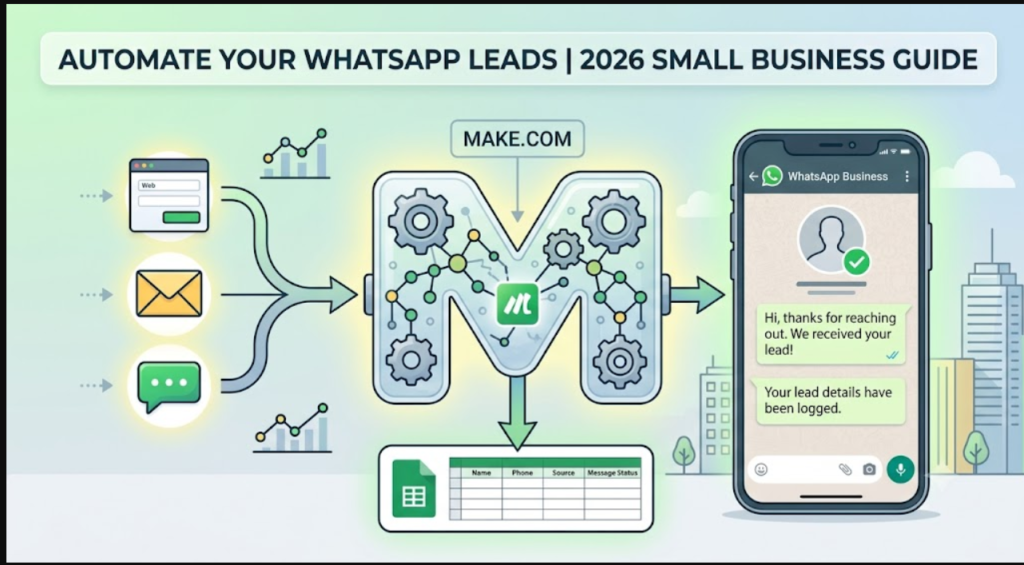
Small businesses in India and the Gulf get many leads through WhatsApp. Make.com WhatsApp automation replies to new leads quickly and logs them automatically, without coding.
What you can automate
- Sending a confirmation when someone fills out a form
- Saving new leads to Google Sheets
- Reminding your team to follow up
Step-by-step setup
- Create a Make scenario and add a trigger, such as Google Forms or a new Google Sheets row.
- Connect the WhatsApp Business Cloud module using your Meta developer credentials.
- Write a message template. WhatsApp requires approved templates for first-contact messages.
- Map the fields, such as name and phone number, into the message.
- Add a Google Sheets step to record the message status.
- Test with your own number, then switch the scenario on.
Best practices
- Get customer consent before messaging.
- Keep templates short and personal.
- Add error handling so failed messages get flagged.
Make vs other tools
Make is a visual builder that offers detailed control over branching and data handling. It suits people who want flexibility without writing code. n8n suits technical users who want to self-host.
Pros and cons
Pros: visual interface, flexible scenarios, many app connections.
Cons: a learning curve, and WhatsApp API setup takes patience.
FAQ
Do I need coding skills? No, but you need to be comfortable with settings and data fields.
Is WhatsApp automation free? Make has a free tier, but WhatsApp messaging may carry its own costs.
Verdict: For lead follow-ups on autopilot, Make is a strong starting point for small teams.
One thought on “2026 Make.com WhatsApp automation”