If you are looking for the fastest way to scale your social media presence, you need to master how to create reels using AI. Below is a definitive comparison of the top tools evaluated in our latest AI Tools Review.
Quick Comparison of AI Reel Generators
| Tool Name | Best For | Top AI Feature | Skill Level |
| Canva AI | Brand Consistency | Magic Media (Text-to-Video) | Beginner |
| Lumen5 | Repurposing Blogs | Automated Storyboarding | Intermediate |
| FlexClip | Captions & Subtitles | AI Audio-to-Text | Beginner |
| InVideo AI | YouTube Shorts & Reels | Prompt-to-Video Scripting | Intermediate |
| HeyGen | Faceless Channels | AI Talking Avatars | Professional |
| CapCut AI | Viral Trends | Auto-Captions & AI Effects | Beginner |
What is AI Reel Creation?
AI Reel Creation is the process of using artificial intelligence to automate video production. Instead of manual trimming and syncing, AI handles the scriptwriting, visual selection, and beat-matching. This allows creators to produce high-quality Instagram Reels and TikToks in minutes rather than hours.
5 Powerful Tools to Automate Your Reels
1. Canva: The All-in-One AI Visual Suite
Canva remains the leader for beginners. Their “Magic Design” for video analyzes the “energy” of your raw footage to match it with a trending audio track automatically.
2. Lumen5: Turning Words into Motion
Lumen5 is essentially a translation engine between text and video. It is the perfect tool for businesses that want to transform their high-performing blog posts into engaging video snippets.
3. FlexClip: Precision AI Editing
FlexClip focuses on the technical hurdles. Their AI subtitle tool is critical for engagement since most users watch social media on mute.
4. InVideo AI: The Prompt-to-Video King
InVideo allows you to type a single sentence like “Create a 30-second motivational Reel about morning routines,” and the AI generates the script, voiceover, and visual assembly in seconds.
5. CapCut AI: Designed for Virality
Owned by ByteDance, CapCut’s AI features are directly synced with TikTok trends. It offers “AI Script to Video” and “Auto-Reframe” tools that ensure your content always looks professional on mobile screens.
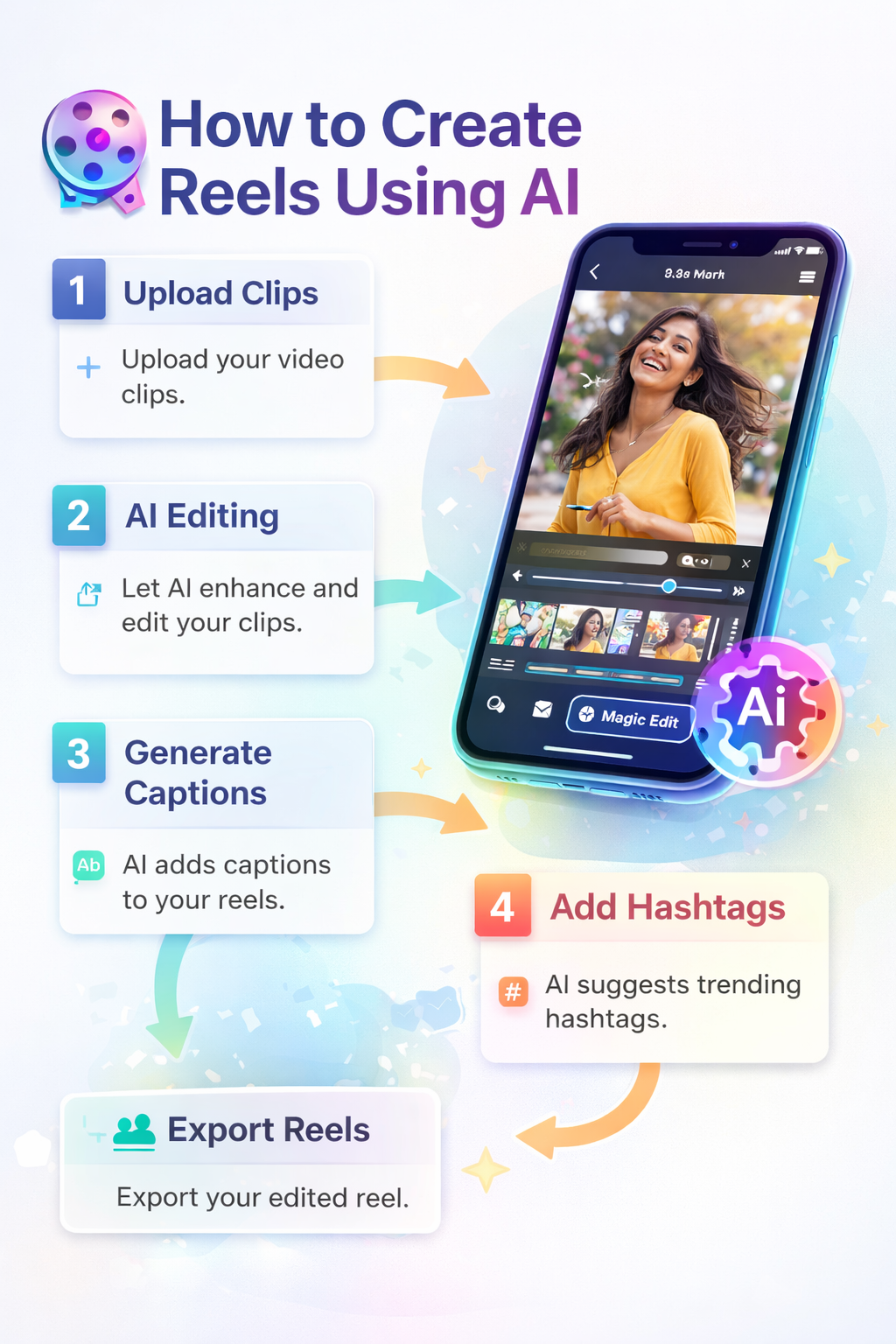
Step-by-Step Workflow: How to Create Reels Using AI
To ensure your content is favored by both the Instagram algorithm and Google’s search AI, follow this specific technical workflow:
- Strategic Topic Discovery: Use an AI LLM to research high-volume keywords.
- Generating the “Hook-Point” Script: AI tools should be used to draft a 30-second script where the “Hook” occurs in the first 3 seconds.
- Asset Assembly: Open an AI Video Editor for Reels and use “Auto-Sync” to align video cuts with audio beats.
- AI-Powered Captioning: Generate burnt-in captions. Google’s video AI can “read” these captions to better understand and rank your content.
- Tagging: Use the best 8 AI Hashtag Generators to maximize reach.
Frequently Asked Questions (FAQ)
1. How do I use AI to make viral Reels?
Focus on the first 3 seconds. Use AI to analyze trending hooks and use an AI Video Editor to keep the pacing fast and engaging.
2. Is AI-generated content allowed on Instagram?
Yes. Instagram’s algorithm prioritizes original, high-value content regardless of whether it was edited by a human or an AI tool.
3. What is the best free AI for Reels?
Canva and CapCut offer the most comprehensive free features for beginners.
4. Can AI generate my voice for a Reel?
Yes, tools like ElevenLabs or the built-in TTS in FlexClip can create human-like voiceovers in any language.
5. How long should an AI-generated Reel be?
For maximum retention, keep your AI Reels between 15 to 30 seconds.
6. Do I need professional cameras to use AI video tools?
No. You can use stock footage generated by Lumen5 or your own smartphone footage.
7. Can I convert my blog posts into Reels?
Yes, Lumen5 is specifically designed to crawl a URL and convert the text into a video storyboard.
8. Will AI video tools make my content look generic?
Not if you customize the templates. Always add your brand colors and unique “Hook” to differentiate your content.
9. How do I find trending audio for my AI Reels?
Most AI tools for Instagram creators have a “Trending Audio” library built-in.
10. Does Google rank AI-generated videos in search?
Google ranks videos based on helpfulness. If your AI Reel provides a clear answer to a user’s query, it will rank.
11. Can I use AI to add hashtags?
Absolutely. Using an AI Hashtag Generator is the best way to find relevant, low-competition tags.
12. Is it hard to learn AI Reel creation?
No. Most tools like Canva are “drag-and-drop,” making them accessible for anyone without editing skills.
Conclusion
The future of content is automated. By learning how to create reels using AI, you aren’t just saving time—you are adopting a data-driven approach to creativity. Start by exploring the Best AI tools for Instagram creators and begin scaling your digital presence today.
Internal Links:
- AI Video Editor for Reels
- AI Hashtag Generator
- Best ai tools for instagram creators.
- Best AI tools for youtube video creators.
- Top AI caption generators 2026.
External Reference: Instagram Creators Page
6 thoughts on “How to Create Reels Using AI: The Complete 2026 Automation Guide”